How Helena Liu Uses AI and Automation to Create Blog Posts
TL;DR: The Quick Summary Imagine a world where your blog posts are generated automatically from the latest news articles in your niche. Thanks to AI and automation, this is now possible. Inspired by Helena Liu’s insights, this guide will walk you through setting up an AI-powered automated blogging s

TL;DR: The Quick Summary
- Helena Liu shares how to set up an AI-powered automated blogging system using Google News, RSS.app, Make.com, OpenAI’s GPT-4, and WordPress.
- This guide helps you create a blog that automatically generates and publishes posts, saving time and money.
- Key steps include setting up an RSS feed, configuring automation in Make.com, integrating with WordPress, and testing the system.
Imagine a world where your blog posts are generated automatically from the latest news articles in your niche.
Thanks to AI and automation, this is now possible. Inspired by Helena Liu’s insights, this guide will walk you through setting up an AI-powered automated blogging system using tools like Google News, RSS.app, Make.com, OpenAI’s GPT-4, and WordPress.
By the end of this tutorial, you’ll have a fully functional automated blog that saves you time and money while keeping your content fresh and relevant. Let’s dive in!
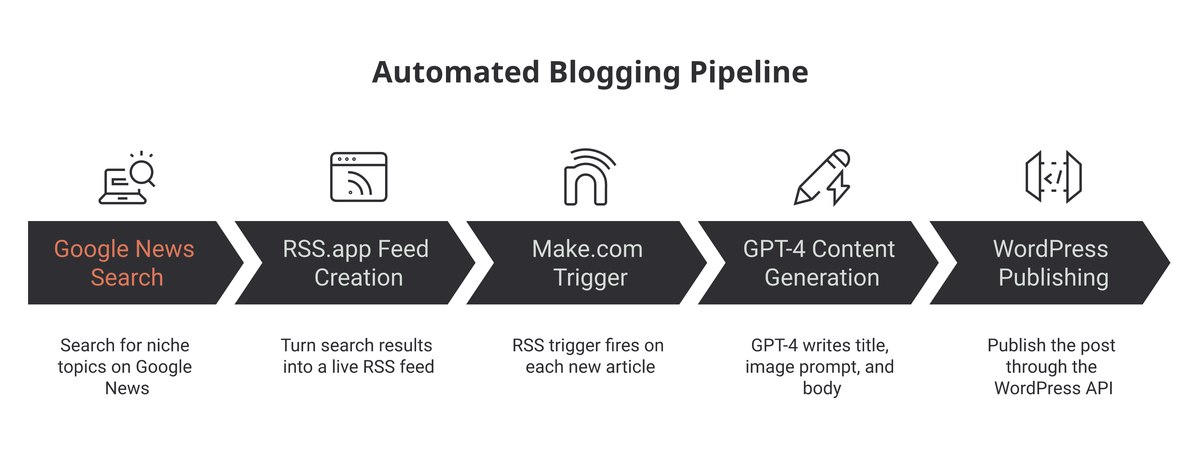
Setting Up the RSS Feed
First, we need a way to fetch the latest news articles in your niche. Here’s how to do it:
- Go to Google News: Search for the topic you want your blog posts to be about. Copy the URL of the news articles page.
- Create an RSS Feed: Head over to RSS.app and create an RSS feed using the URL you copied from Google News. This feed will automatically update with the latest news articles.
- Copy the RSS Feed URL: Once your feed is generated, copy the RSS feed URL. We’ll use this in the next steps to set up our automation.
Configuring the Automation in Make.com
Make.com is a no-code robotic process automation (RPA) tool that will help us automate the blog post creation process. Here’s how to set it up:
- Log into Make.com: Create a new scenario for your automation.
- Set Up the RSS Feed Trigger: Use the RSS feed URL from RSS.app as the trigger in Make.com. This means every time there’s a new article in the feed, the automation will start.
- Generate a Blog Post Title: Add a module in Make.com to generate a blog post title using OpenAI’s GPT-4 model. This ensures your titles are engaging and relevant.
- Generate an Image Prompt: Use another module in Make.com to create an image prompt with GPT-4. Visual content is crucial for blog engagement.
- Generate Blog Post Content: Add a module to generate the actual blog post content using GPT-4. This AI will create high-quality, readable content based on the news article.
- Configure WordPress Integration: Finally, set up the WordPress integration in Make.com by adding your WordPress API key and domain. This allows the automation to publish directly to your blog.
Testing and Finalizing the Automation
Now it’s time to test your setup and make sure everything is working smoothly:
-
Run the Automation: Trigger the automation in Make.com and review the generated blog post on your WordPress site.
-
Additional Configurations: You can set the post status to draft or published, save the generated image to your server, and add the image to the blog post.
My Take: What This Means for Solo Publishers
Helena’s system is a clever proof-of-concept, and the Make.com + GPT pipeline is genuinely useful. But two years into watching these setups play out in the wild, here’s my honest assessment for affiliate publishers.
The fully automated version is a dead end for affiliate SEO. Google and ad networks have caught up. Mediavine is vetting sites for AI content, and Google’s quality signals are getting sharper at detecting unedited AI output. If you build a pure fire-and-forget content factory, you’re building on sand. The post itself even admits the earnings claims are inflated — that’s the tell.
What the system IS useful for: volume drafting in clusters you actually intend to edit. If you’re doing programmatic SEO with AI, this kind of RSS-triggered pipeline is a legitimate way to generate first drafts across a topical cluster — but you’re editing every single one before it goes live. The automation saves 60-70% of the writing time; the human edit is what makes it publishable.
Make.com is still the right tool here. I’ve used it for automating other publishing workflows and the WordPress integration is solid. But don’t use GPT-4 for every step — GPT-4o mini cuts costs by 90% for formatting and metadata tasks, and quality is identical for structured output.
The bigger shift nobody’s talking about: LLM-driven SEO changes what “good content” means. AI search engines are chunking your content differently than Google does. An automated post that hits keywords but has no original analysis, no specific data points, no author opinion — it’s invisible to LLM citations. The chunk-ranking paradigm rewards density and specificity, which is exactly what unedited AI output lacks.
What I’d actually implement: Use the RSS trigger and GPT draft step from Helena’s workflow. Add a human review gate before publication — don’t skip this. Layer in your affiliate angle, your product picks, and one or two real-world observations that AI can’t generate. That hybrid approach works. A systematic reoptimization pass on your best-performing AI-assisted posts is also worth building into the workflow. The fully automated publish-to-WordPress version on its own doesn’t hold up — at least not sustainably past 2024.
Action Items
Here’s a quick checklist to ensure you’ve covered all the steps:
- Go to Google News and search for your desired blog topic, then copy the URL.
- Create an RSS feed on RSS.app using the URL from Google News.
- Copy the generated RSS feed URL from RSS.app.
- Log into Make.com and create a new scenario.
- Set up the RSS feed as the trigger in Make.com using the URL from RSS.app.
- Add a module in Make.com to generate a blog post title using OpenAI’s GPT-4 model.
- Add a module in Make.com to generate an image prompt using GPT-4.
- Add a module in Make.com to generate the blog post content using GPT-4.
- Set up a WordPress blog by purchasing a domain and hosting service, installing WordPress, and configuring the Make plugin.
- Configure the WordPress integration in Make.com by adding your WordPress API key and domain.
- Test the automation by running it in Make.com and reviewing the generated blog post on your WordPress site.
- Optionally, configure additional settings like post status, save the generated image to your server, and add the image to the blog post.
- Join the author’s community for access to the complete automation setup.
Conclusion & My Take
While it’s okay to use AI and automation for some parts of your blog, be sure to optimize it for your needs and combine it with a final editing process and human-written content.
The image automation process may not always produce the desired output, and it’s often best to handle the images manually to ensure quality and relevance.
I do not encourage trying to sell these AI-generated articles on article platforms, as it is likely against their guidelines. Additionally, ad networks like Mediavine are implementing strict checks to prevent AI-generated blogs from joining their networks.
So, be cautious about the potential earnings mentioned, as they might be exaggerated or not easily achievable for everyone.
For a detailed walkthrough, check out Helena Liu’s YouTube video:

Watch: How to Make $30,000/Year Blogging Using AI & Automation (step-by-step course)
Frequently Asked Questions
What tools does Helena Liu use to automate blog post creation?
Helena Liu’s automated blogging stack uses five tools chained together: Google News and RSS.app to fetch the latest niche articles, Make.com as the no-code automation layer, OpenAI’s GPT-4 to generate the post title, image prompt, and content, and WordPress to publish. Make.com’s RSS trigger fires on each new article and routes it through the GPT modules before posting.
How does Helena Liu’s workflow generate a blog post automatically?
Helena Liu’s workflow starts when an RSS.app feed (built from a Google News search) detects a new article, which triggers a Make.com scenario. Make.com then calls GPT-4 to generate a title, an image prompt, and the full post content, before publishing the result to WordPress via its API. The whole pipeline runs with no human in the loop unless you add a review step.
Does fully automated AI content rank or get cited?
No — the post argues the fully automated, publish-without-editing version is a dead end for affiliate SEO. Google’s quality signals and ad networks like Mediavine now vet for unedited AI output, and content with no original analysis or specific data is invisible to LLM citations under the chunk-ranking paradigm. For why specificity matters to AI engines, see GEO.
How should publishers actually use Helena Liu’s automation?
Publishers should treat Helena Liu’s system as a drafting tool, not a fire-and-forget factory. The recommended approach keeps the RSS trigger and GPT draft step but adds a human review gate before publishing, layering in an affiliate angle, product picks, and real-world observations AI can’t generate. The automation saves an estimated 60-70% of writing time, while the human edit is what makes the post publishable.